Linux - Change Permissions Recursively

- Posted in Linux/Unix by

I will not go long, but never, never, ever set file permissions to 0777 on production servers (or for that matter any server). This leads to WORLD writable and leads to security issues, including take-over/spamming and what not.

Always keep the file and directory permissions to minimal. Many applications frameworks request/suggest to keep permissions for all directories to 0755, and all files to 0644.

So, let us try that out and do it smartly this time.

Change Permissions Recursively

Change directory with cd command to the desired location under which you need all directories to have the permission level to 0755, and all files to 0644.

cd /home/user/public_html

Then use the first command below to chmod 0755 for all directories and sub directories. The second command will change all the files permission to 0644 (chmod 0644) under the directory tree.

find . -type d -exec chmod 0755 {} ; find . -type f -exec chmod 0644 {} ;

You can also change permission using xargs command to do this quickly.

find . -type d -print0 | xargs -0 chmod 755
find . -type f -print0 | xargs -0 chmod 644

Here the directory permission 0755 is similar to “rwxr-xr-x” and the file permission 0644 is equal to “rw-r–r–“.

Change Permission for Specific files

Instead of changing permission for all files, you can also target the specific files with similar extensions. For example, if you have a PHP application on your server, & you don’t want to allow others to execute the PHP files, then use the following command to chmod 0640 all of those files with php extension:

find . -type f -name "*.php" -exec chmod 0640 {} ;

The file permission 0640 will restrict others with no permissions. This adds an extra layer of security under permissions.

Setting self hosting at home & related horrorsssss

- Posted in Club Frenzy by

So, this is what I call horrrrrorrr of horrorrsss.. Don't trust me? Try it yourself, when you are not a tech-funkiee.
backbone-shh

So, it all started with my mind going open source, few years back. I have been trying hard, but with limited resources, finance being a hurdle and more, I started saving as much to as little as possible, cutting down on a lot of my expenses. It took me around 4 years to gather money up so that I could go for a couple of domains and get them up for the next 10 years at least, while making sure, I save enough for the next 10, and next 10 and so on.

Now, while I was saving money, I was in parallel lookigng for guides and reading through to find out what all are needed. Domain [check], DNS [check], certificates & privacy [check], hosting [woah... no check].

Now, I was aware we needed apache2, virtual hosts, nginx and whatsh** for a lot and all of this, and not to forget, languages (not spoken, but written), html, php, and .....

Anyways, not dragging this one out here, and I will speak of it on my other post in a few days time, back to this post.

For the last 3 weeks, I am kind of glued to my laptop.

HP Notebook from 2014 build year, Li-on battery (heats like hell), i3-5005U CPU, L2 cache, 16GB RAM, 1TB HDD (formatted and am running MX 21.3 since 3 days now), 248GB SSD (currently running W11, fully modified, no cr**), KVM disabled, Intel 5500 Graphics, and the long list. You get the gist, I am sure.

What has been eating me is this: I paid for unlimited (even though shared hosting), and now everything has been limited, badly. I can run very limited stuff, and that too if one job runs, and has say number of processes, the system automatically gets overrun and a lot of other things stop, ruined, messed up.

Anyways, so, I went over to internet, and searched and searched, and searched. Was getting very difficult to find me resources which cater to either something in recent times, and something which can at least give me basic idea and steps to run things.

I found few sites, few blog posts, few even detailed guides, but 90% of those were related either to only Windows based hosting, and or Ubuntu/Debian Server based hosting. There were many CentOS/Rhel etc based as well, but they were so aged, that even older generation would call it the era of eons...

Now, while I had in mind what I needed, I am not a technical person at core. I understand concepts, I can read and probably modify codes to make things work, but if you get tooooo technical, I will either ask questions, or might jump to my own understanding, thereby messing it up completely(unfortunately at times), and other places where I can find the right information at the appropriate time.

So, 3 nights back, or rather 4 nights to be precise at the time of writing this paragraph, I started fiddling with my MX OS, and did soooo many things as guided here, even though it is old, it is the only one I could find with proper guidance and mentioning with details, thereby helping me get some understanding. Mind it, I had this site with me for the last 4 weeks, but I was trying to get a proper linux build to try it on. The horrors of that and more during the MX setup is another story and for some other post.

So, I started fiddling, and went on and on with everything that I could get from those steps, as I do understand a bit of terminal(ogy), and can glide through it, with much of it not requiring a hand. When I finally thought at 0128 hours my time that I finally had done it, is when I stumbled upon more stupidity in life. My sample site though had everything in place was still not showing up, and instead, I found another stuff gawking at me with all its might..

Imagine my state. I was anyways tired, been working the whole day and then taken to this plate of self-hosting surge of energy, I worked from 20:40-21:00 and at 0128 hour the final hour made me lose it. Fed up, I got so irritated, I went to various sites trying to get a solution to it. Alas, my boding went till 0350, when I finally gave up and finallllly went to get some sleep.

What did I fumble onto, which made my life so horrific for the next 2-2.5 hours? What led me to go on still, and kind of stay up to find a solution no matter what for those 2+ hours?

Ohh, and what about my reaction, my understanding, of the final output at 01:28 hours? What was it?

Find out this and more on the part II of this mind boggling thread (coming soon).

Keep a tap on this post for the linkage and updates.

Till then, keep your mind free to be more boggled later on!!!


#### Updated: 25.06.2023

So, the horror stood me up on my path and left me astray. Finally 2 weeks ago, I gave up all the hope of self-hosting from my home.

Chasers upon chasers, static IP always routing through to sub-router and the NOC team were never able to solve it.

That shows, what level of study they did and what level of knowledge I have. I was guiding them the whole time and explaining to them why something was happening.

So, my local ISP did give me a static IP, however, for reasons they were never able to find, the IP was routing to the middle router and not opening up WWW for me. No amount of port forwarding, or for that matter no amount of headaches made it any simpler, or was even able to resolve it.

The only time it would open up was when it was on Dial-UP or ADSL mode (direct PPPoE) and not via router PPPoE, MSDL, or even Wi-Fi Route.

I and one of the local team member banged our heads for almost 3-4 weeks (and you know, hardly anyone works after 6PM, or that the tea breaks are for 1 hour and lunch breaks are for 2 hours). I have my office work too, and blah blah blah...

Anyways, after going over so many trial-error methods (almost 12-15 times we tried in various manners), that the local guy gave up and me too started trending for me.

So, the part of all this brick in the wall is: My Self-Hosting can only work, or let me put it this way, can only be tried again if I meet at least the below stated criteria:

*New ISP, probably some company that has a better NOC team members *New Laptop (my current one is a mess, and may go dead any day now) *Rather, a desktop, which can be a better choice (my first ever was an assembled one, and I still have few things from that desktop) *Money.... The biggest trouble for me since ages. Taxes are eating up most of my income and I am not getting any younger anyways...

Anyways, Adios on this one for now!!!
Web Fingerprinting gets frighteningly good: sees through VPNs and Incognito Mode

- Posted in Computers! by

This thread details has been added here as read in ghacks.

gHacks thread

Web Fingerprinting gets frighteningly good: sees through VPNs and Incognito Mode

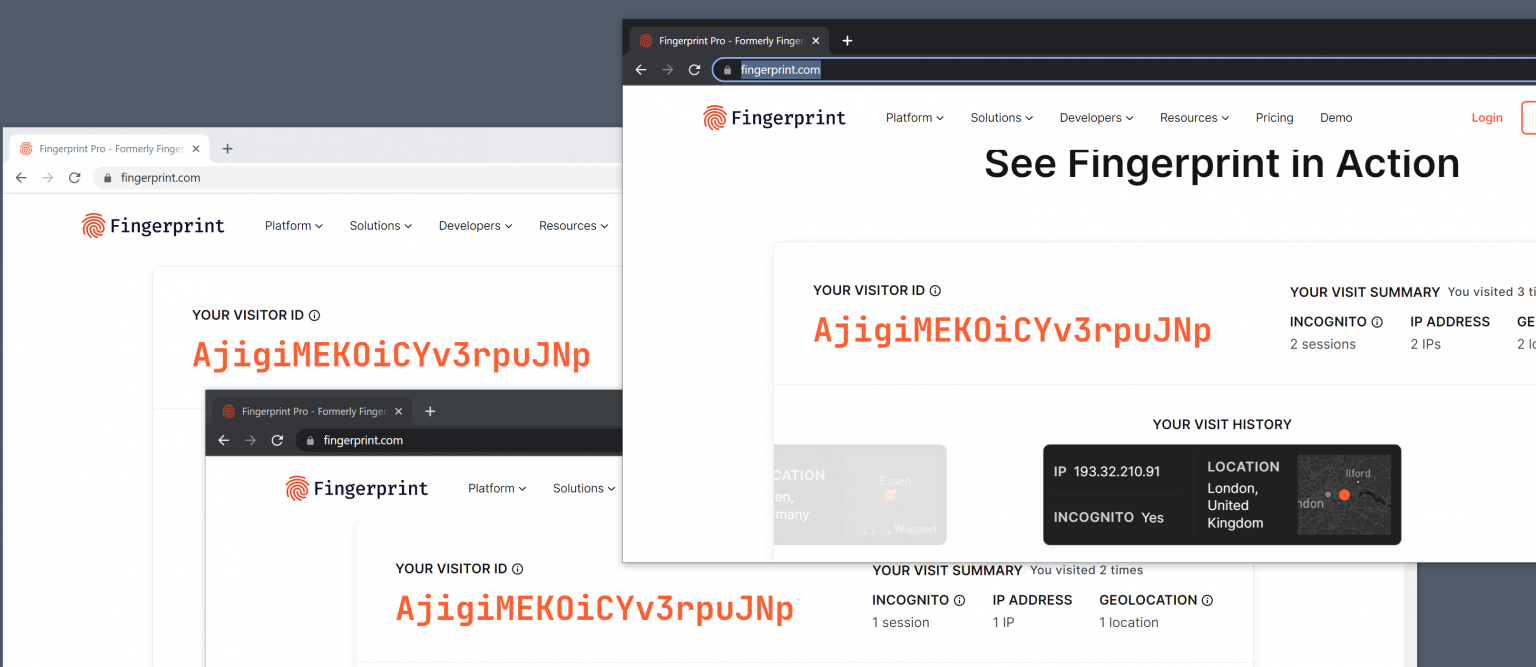
Local tests done in several web browsers confirmed the accuracy. The website identified three visits using Firefox, Firefox with private browsing mode and Firefox with private browsing mode and a VPN connection, as coming from the same user.

How to protect against fingerprinting

Internet users have two main options when it comes to protections against fingerprinting-based tracking. Either use a browser with proper protections against these types of tracking, Tor Browser or Firefox with privacy.resistFingerprinting set to TRUE are two valid options, or use different web browsers for different tasks.

Extensions that block the execution of scripts on websites may also protect against fingerprinting. Browser users may check out NoScript for that, which may be configured to block scripts by default. The popular uBlock Origin extension may also be configured to block all JavaScript by default.

Local Tests

Rest in the gHacks post, in the URL above.

File sharing ZippyShare is planning a shut down my March end, 2023!

- Posted in Computers! by

Imagine!!

Just read through that ZippyShare is shutting down completely by the end of this month, and that they have asked users to backup the individual data. There is only a banner at the top of the site, but the following blog post makes it open as to why the reason to shut completely: https://blog.zippyshare.com/?p=1211

Banner Thread

Information about the closure of the project March 19, 2023

Hey Folks,

We’ve decided that we’re shutting down the project at the end of the month. Please make backups of your important files, you have about two weeks to do so. Until then, the site will run without any changes.

There are several reasons for the closure:

– Since 2006 we have been on the market in an unchanged form, that is, as ad financed/free file hosting. However, you have been visiting in less and less over the years, as the arguably very simple formula of the services we offer is slowly running out of steam. I guess all the competing file storage service companies on the market look better, offer better performance and more features. No one needs a dinosaur like us anymore.

– All sorts of adblockers, whether built into the browser, as add-ons, or in the form of DNS services. Sure, we all use them, but they take away any control the site owner has over the site. Eventually we get to the point where a vicious cycle begins, in order to pay for the server infrastructure you are forced to place more and more ads, then users fire up more and more adblockers and we get to a point like today.

– Rising electricity prices. Over the past year, electricity prices have gone up 2.5 times, which, with a large number of servers, gives a significant increase in costs that we have no way to balance.

There are still a bunch of smaller reasons, but we could write a book on this, and probably no one would want to read it.

To sum it up, we can no longer afford to maintain the site.

You can send us any comments to (we’ll read them all, we’ll probably respond to just a few): support@zippyshare.com

Thanks for being with us over the years.

See you in the depths of the Internet. o7

I have raised a ticket with them to see if I can buy it out, of course if my budget allows. Let us hope it is within my budget, as I really hate to see something like this go down for such a small reason.

W11 God Modes

- Posted in Computers! by

How to activate all of Windows 11's secret God Modes

Windows 7 introduced a useful hidden God Mode that displays all of the admin tools and control options on a single screen. Because Microsoft has yet to phase out Control Panel entirely, this feature works just fine in Windows 11.

It’s very easy to action God Mode -- you just need to create a folder and give it a special name -- and there are actually quite a few alternative God Modes available. Here’s what you need to do.

To activate God Mode, right-click the desktop and select New > Folder. Highlight this folder, press F2 and name it:

GodMode.{ED7BA470-8E54-465E-825C-99712043E01C}

Hit enter. Open that folder and you’ll have instant access to a wide range of system settings.

If one God Mode isn’t enough for you, there are multiple other options available. Follow the same process as above, but use one of the following alternative strings:

Default Programs.{17cd9488-1228-4b2f-88ce-4298e93e0966}

My Computer.{20D04FE0-3AEA-1069-A2D8-08002B30309D}

Network.{208D2C60-3AEA-1069-A2D7-08002B30309D}

All Networks For Current Connection.{1FA9085F-25A2-489B-85D4-86326EEDCD87}

Programs and Features.{15eae92e-f17a-4431-9f28-805e482dafd4}

Power Settings.{025A5937-A6BE-4686-A844-36FE4BEC8B6D}

Printers.{2227A280-3AEA-1069-A2DE-08002B30309D}

Icons And Notifications.{05d7b0f4-2121-4eff-bf6b-ed3f69b894d9}

Firewall and Security.{4026492F-2F69-46B8-B9BF-5654FC07E423}

All NET Frameworks and COM Libraries.{1D2680C9-0E2A-469d-B787-065558BC7D43}

Application Connections.{241D7C96-F8BF-4F85-B01F-E2B043341A4B}

Administrative Tools.{D20EA4E1-3957-11d2-A40B-0C5020524153}

Credentials and Logins.{1206F5F1-0569-412C-8FEC-3204630DFB70}

Speech Recognition.{58E3C745-D971-4081-9034-86E34B30836A}

That's all there is to it!

CREDITS: betanews

[Unix/Linux] Manipulating PDF's

- Posted in Linux/Unix by

This thread is just to share couple of excellent applications, open source and for Unix/Linux systems (probably has windows package too) for arranging PDF files, and or combining, bursting PDF files.

We all know how these portable document files are, and so heavy too. Unlike PDF24, which is only for windows, this application is a great tool for people like myself, who prefer GUI over CLI (though, I admit, CLI is more intuitive then GUI), but trust me, GUI has its niche and is better eyed compared to CLI.

For the most part, PDF documents are generally designed to be read, but not altered or modified (coming from old ages). They are useful for sharing information in a consistent format, but manipulating the contents of a PDF document can be medial to difficult. Many applications which display PDFs do not provide the necessary tools for editing or rearranging the pages of these documents.

First, let's look at a desktop application for managing PDFs.

PDFArranger can generally be found in the repositories of modern versions of most distributions.

The application features a pleasantly simple interface. At the top of the window is a menu bar where we can choose to import existing documents and perform simple manipulations on documents or pages we have selected. Below this, the bulk of the window displays the document pool. Any PDF we import into PDF Arranger is divided into individual pages. These pages are displayed, in order, in the pool. If we import multiple documents, their pages will all be shown in the pool.

We can then use the mouse to drag and drop a page into a new order in the pool. We can also use the Shift and arrow keys to highlight groups of pages to manipulate. Once a page (or multiple pages) have been highlighted, we can choose an action to perform on them. We can delete pages from the pool, rotate them, or crop their edges. Then we can re-arrange them into the order we like.

Once we have re-arranged and manipulated the pages into the form we want, we can either select a range of pages to export into a new PDF, or we can export the entire pool into one new, big PDF.

PDFArranger PDF Arranger -- Manipulating a single PDF page


There are also command line tools for working with PDFs. My favorite is a tool called PDFtk. Now, to be accurate, there is a desktop version of PDFtk, but I prefer PDF Arranger's desktop interface while I like the flexibility and script-ability of the command line version of PDFtk.

The PDFtk program is run with a series of parameters. Typically we start by passing PDFtk a list of documents we want to manipulate. Then we provide it with an action command, indicating what kind of operation we are performing. Then we provide the keyword output followed by the name of the file we are going to create. This output file contains our changes.

In its simplest form, PDFtk does not need to be given any action command. We can, technically, give it an input file to work on, the keyword output, and the name of a new file to create. This effectively makes a new copy of our PDF. This can be useful either for testing purposes or to try to repair any damaged meta-data in the original document. Here is what a PDFtk command looks like when we want to just make a clean copy of the original file:

pdftk original.pdf output new-file.pdf

While PDFtk supports a lot of action commands and options, I want to focus on five. These are called:

  • cat - merge together a series of pages from one or more documents
  • shuffle - collate multiple pages, usually from multiple files
  • burst - expand one PDF document into multiple, one-page documents
  • rotate - turn pages on their sides
  • unpack_files - extract files embedded in a PDF and save them in a directory

Let's look at a few examples of these action commands being used. This first example uses the cat action command. This allows us to either insert pages of documents into one big document, or possibly remove a series of pages. Here we append one PDF to another one, making one long document:

pdftk original-one.pdf original-two.pdf cat output new-long-file.pdf

We can also specify a range of pages to collect and place in the output file. For instance, here we take the first 5 pages, and then every page from page 20 until the end of the document. All of these end up in one final PDF with the original pages 6 through 19 removed.

pdftk original-file.pdf cat 1-5 20-end output new-file.pdf

Here is one more example where we simply reverse the order of all the pages in a document, handy for when we fed pages the wrong way around into the scanner:

pdftk backward-file.pdf cat end-1 output proper-order.pdf

The shuffle command works in a similar way to cat, but it takes the first page of each specified file/range in parallel and places them in the output file. This effectively collates the original files. The next example effectively merges two documents, placing their pages together as if they were shuffled together like a deck of cards:

pdftk left-pages.pdf right-pages.pdf shuffle new-book.pdf

The next example takes one PDF file and creates a new PDF for each page included in the original. When it is done we end up with files named pg_0001.pdf, pg_0002.pdf, pg_0003.pdf, etc:

pdftk original-file.pdf burst

The rotate command is fairly straight forward. It turns a PDF's pages around, usually 90 degrees left or right. We can also tell PDFtk to rotate a page to an absolute position using the four compass directions: north, south, east, and west. For example, this command rotates every page 90 degrees to the right:

pdftk original-file.pdf rotate 1-endright output new-file.pdf

While this next example will turn all the pages in the document upside down. This is again helpful if every copy was scanned upside down and we want to correct it:

pdftk upside-down-file.pdf rotate 1-endsouth output fixed-file.pdf

Finally, the unpack_files command extracts the file elements from a PDF and places them in a directory. In this case we dump the contents of the PDF into a new directory called target-directory:

pdftk original-file.pdf unpack_files output target-directory

The PDFtk software can do more operations, including compressing files and working with passwords. However, these are probably the most commonly used operations.

enter image description here PDFtk in action (free version)


Necessary Links: 1. https://github.com/jeromerobert/pdfarranger 2. https://pdflabs.com/tools/pdftk-the-pdf-toolkit

Self-Hosting!

- Posted in Computers! by

Self-Hosting!!!

Self Hosting is a form of running your own website or application by setting up a server and network yourself. Self-hosting is also the activity of having and administrating your own server, typically at home, to host your personal data and services yourself instead of relying exclusively on third-parties. For instance, you can self-host your blog, such that it 'lives' on a machine that you have control of, instead of having it on somebody else's computer (a.k.a. The Cloud) in exchange for money, seo-advertisement or selling of your private data.

Self-hosting ideally implies owning a server. A server is a computer which is typically accessible on the network 24/7, and usually does not have any screen or keyboard (it is instead controlled remotely). Contrarily to a popular belief, a server is not necessarily a huge and extra-powerful machine: nowadays, a small, ~$30 ARM board is adequate for self-hosting. However, this does not mean you cannot host anything on your own laptop/desktop.. Of course you can anytime.

Self-hosting is not about making "your Internet" more secure and does not provide anonymity by itself. Instead, it is about being autonomous, and in control of your services and data - which also means being responsible for them.

Why should you host yourself ?

You believe in a free, open and decentralized internet. In a centralized internet, private companies and government can spy, analyze and influence people by dictating how they connect with each other, and by filtering content. There are many hosting applications/servers developed by a community who believe in an open and decentralized internet, and we hope that you do, too! So, find them in the world of computers...

You want to have control of your data and services. Your pictures, chat messages, browsing history, and that text you are writing for school, have nothing to do on somebody else's server (a.k.a. The Cloud). They are part of your private life, but also part of your family's life, your friend's life, and so on. These data should be managed by you, not a random company in the US who wants your data to analyze them and sell the results.

You want to learn about how computers and the Internet work. Operating your own server is a pretty good context to understand the basic mechanisms at the heart of operating systems and the Internet. You might have to deal with command line interface, network architecture, DNS configuration, SSH, and so on.

You want to explore new possibilities and customize things. Ever dreamed of running a Game server for your friends, or a persistent IRC or XMPP client? With your very own server, you can manually install and run virtually any program you want, and customize every bit.

Why should you not host yourself ?

Self-hosting requires some work and patience. Hosting yourself is a bit like growing your own garden or vegetables: it requires work and patience. While those few open source images for home servers aim to do all the hard work for you, self-hosting still requires that you take time to learn and configure a few things to setup your server properly. You will also need to perform maintenance tasks (such as upgrades) from time to time, or to ask for support if some things break.

With great servers comes great responsibilities. Operating a server means that you are responsible for the data you are hosting. Nobody will be able to recover them for you if they get lost. Very few servers (images and open source images) provide backup features, and if they do, you should use the feature regularly to backup the configurations and data you care about. You should also keep an eye on security news and recommendations so that your server or critical data don't get compromised.

Quality and performance probably won't be as good as premium services. You should try and use those open source host images (and most of the applications packaged for it) which are free and have imbibed open-source software, developed by communities of people in their free time and on the basis of best effort. There of course is no absolute guarantee that those softwares will work in every possible circumstance. The performance of your self-hosted server is also related to its CPU and RAM, and to the available internet connectivity.

Edit/Update: 25.04.2023 - Read about my experience of self-hosting setup at home in the thread here.

ClamScan Guide

- Posted in Guides by

A step by step guide on how to use CLAMSCAN for scanning any file/folder/drive letter.

  1. Open Clamscan application (I use it as a portable app, which makes it much more easier for me). A GUI opens (similar to this one, unless there is any other GUI available in the market, lols)

Main GUI

  1. You will notice the drive letters being shown. Example, A, B, C, D. Let us image you are using C:UsersPCUSERNAMEHEREDownloads, the downloads folder for saving your file. It maybe any file. ISO, ZIP, RAR, Executable, or anything at all. Please note any ISO/Mountable file being shared needs to be mounted (be it Windows or Linux OS you use, mount it), and then the path where the file gets mounted to needs to be scanned. Example let us say I mount 123.ISO and it gets mounted to G drive. In that case, after mounting, when I open clamscan, the GUI will show G drive letter as well. See example in the image below, where the G drive is the DVD Drive (icon also shows DVD). Even better if you can share the snap of the actual explorer drive like image one below, where it shows actually what ISO file I have mounted (of course not everything can be used or shown, and there is a certain level of trust imbibed by default):

Main Drive File Explorer Image Drive letter highlighted

  1. Now in order to show the actual file/folder being scanned, double click the drive letter where it is kept / mounted. In the 2 examples images, the first one shows the file/folder path as: C:Users/PCUSERNAMEHERE/Downloads (select and highlight the file/folder you want to scan) The second image shows an ISO file I mounted for this tutorial purposes on Drive G. Select the Drive Letter (you can expand all folders within the drive in clamscan app)

Tip: Select SHIFT Key to select multiple files/folders/drive letters.

example folder selected example drive letter selected

The above images are for your understanding purposes and not exactly how you need to share the final snapshot. See point 4 for the next step.

  1. After selecting the file/folder/drive letter, ensure you place the main clamscan app screen at the very top of your PC screen. Then click scan for the scanning to start. Example snap has me just scanning the 7z file here, and hence I have placed the scanning progress screen in alignment with just the file name highlighted here (you can see the highlight via the greying of the selected file name). BTW, be sure your virus signature database is updated from Tools > Download Virus Database Update After the virus database loads (time to load depends on the number of signature bases against the file hash and the size that the clamscan reads against the file/folder items and also the CPU running load. At one point, the progress status shows the name of the file/folder being scanned as well. You maybe able to take the snap of it, or may not (smaller items, the progress status runs away in a click). My second snap shows the same. Finally the scan results will pull up in the status with the scan details including the file size and the time taken etc details. See the 3rd snsapshot for the details. The third image is the final image usually to share as your virus scan result in the example of 7Z scanning.

Loading virus signature database File/folder name being scanned scan result

The first image below shows the G Drive (where my ISO is mounted) details which have started to scan. The second image shows the drive fully scanned and the scan results with the specifics and details of the scan. The second image is the final image usually to share as your virus scan result in the example for ISO mount scanning.

status with ISO name scan result (iso)

The final image is what you must usually share here, which not just shows the scan results, but also the file/folder being scanned by you.

Any & all suggestions as well as comments are welcome. :)

Believing in books

- Posted in Amazing Books by

This is my own craft: reading is one dynamic stuff, which is always constant in nature...

I just had a very interesting session in one group forum chat box, and it was like, I finally had someone to actually speak on books, music and something, which I really love.

For most people, book lovers are called book worms, but in reality, calling an avid reader, an eccentric reader, a worm, is not just the right annotation. It is more of a buzz kill, compared to the likelihood of ever being getting a hug by a tiger or even worse a life invitation by a hyena. It never happens.

You know, books can do no harm (except for ******), which is also not bad, as you can jolly well learn a lot of tricks from the old hat.

Anyways, on a honest try, books are the best covers for life. Dreams are never considered big, but books are called based on the number of pages, and if there is no images/imagery present within, people consider it a waste. Why? Ever wondered, why a simple thrust like sneezing is compared to books?

One author asked: Who moved my cheese?? Well, how the heck would others know, when you yourself do not know it.

Anyways, what I mean is, inspirational books are just for the sake of it. Trust me, no book or author can inspire you, since inspiration is not a bird, which makes nest with the golden goose. No sire, inspiration is just another outlook for the outreach of your own conscience, which is not an eye opener due to some speaker, or an author. It is the word(s), which made that affect on your mind, your brain, your heart.

What no one bothers to divine, is that books are best, cause they are filled with words, and each word makes for a different world to each individual, and at times to non-living things too.

To wrap it up, this boggle means something to me, as it will mean to someone out there, and if it does, I am sure, he or she will be on the same lines as I am, thinking not with mind, but with the heart to make wonders and dreams beyond their reaches.

Präsenz-Gegenwart

- Posted in First Timers by

Online Presence!

Anyways, to continue, does so called online presence mean so much to all? Take me for example. Am I not being one myself, now that I am writing on my own blog? Does this make me a hypocrite? Probably yes, probably no. It depends on individuals choice of processing those small particles which exploded the micro-second your eyes (you the reader) saw the word "hypocrite" above, and instantly jumped to a conclusion of yes or no.

In essence, you are right, you are wrong, which neither matters, till the time the goal is reached.

So, whose goal is it? Mine? Yours? Someone else's? Worlds? Who knows, and who cares, right?

Positive, or negative does not matter, and the same way the goal does not matter, till the time you or me/myself, determine oneself to be true to the point, where we are right and are free of any sort of attachments.

Basically!!!

So, what do I mean by the rant above?

Simple. it is all up to you to identify your own presence within yourself and walk the path you wish to. So, again, for the legion of bloggers out there, here I come, with my point of view and my presence with words in the world of my own.

I will and have always been of the thought that: This moment is never going to last forever, and thus enjoy what you have and do not let anyone else tell you or sway you any other "wise".

More to come..