[Guide] Increase max characters posting count limit for self-hosted Mastodon server

- Posted in Guides by

If you search for the max_characters keyword in the Mastodon Github repository, you will see that it all points to the value within the StatusLengthValidator and a variable called MAX_CHARS.

MAX_CHARACTERS_LOCAL  = 255

To modify it, first, ssh into your Mastodon server, and switch to the root shell:

sudo -s

Then, switch to the Mastodon user

su - mastodon

Now, modify the validator file:

nano -w live/app/validators/status_length_validator.rb

At the very top of the file, you will see the MAX_CHARS variable, which was by default 500, you can modify it to another integer, for example 3000 to allow a maximum of 3000 characters within each post.

class StatusLengthValidator < ActiveModel::Validator
  MAX_CHARS = 3000
  URL_PLACEHOLDER_CHARS = 23
  URL_PLACEHOLDER = 'x' * 23

Exit to root shell and restart the Mastodon processes, or simply reboot.

exit
systemctl restart mastodon*

[Guide] PuTTY Backup & Restore [Windows]

- Posted in Guides by

Export

cmd.exe, requires elevated prompt due to reg-edit:

Only sessions (produces file putty-sessions.reg on the Desktop):

regedit /e "%USERPROFILE%\Desktop\putty-sessions.reg" HKEY_CURRENT_USER\Software\SimonTatham\PuTTY\Sessions

All settings except ssh keys (produces file putty.reg on the Desktop):

regedit /e "%USERPROFILE%\Desktop\putty.reg" HKEY_CURRENT_USER\Software\SimonTatham

Powershell

Only sessions (produces file putty-sessions.reg on the Desktop):

reg export HKCU\Software\SimonTatham\PuTTY\Sessions ([Environment]::GetFolderPath("Desktop") + "\putty-sessions.reg")

All settings except ssh keys (produces file putty.reg on the Desktop):

reg export HKCU\Software\SimonTatham ([Environment]::GetFolderPath("Desktop") + "\putty.reg")


Import

Double-click on the *.reg file and accept the import.

Alternative ways:

cmd.exe, requires elevated command prompt:

regedit /i putty-sessions.reg
regedit /i putty.reg

PowerShell

reg import putty-sessions.reg
reg import putty.reg

Note: do not replace SimonTatham with your username.

Note: These commands will not export the related SSH keys.


Via Registry Editor

Export

  • Launch Run, then type regedit in the open drop down window
  • Navigate to HKEY_CURRENT_USER\Software\SimonTatham
  • Right click on SimonTatham key (directory icon), select Export. Give the file a name (say) putty.reg and save it to your location for later use.
  • Close Registry Editor.

Note: The export (full) will also export the related SSH Host Keys.

Import

  • Check previous method(s)

PuTTY Portable Restore

[path_to_Your_portable_apps]PuTTYPortable\Data\settings\putty.reg

[Guide] USSD UPI

- Posted in Android by

TL;WW


I tried paying via USSD UPI today, and it worked. I had to use the UPI ID function, and did not go through with mobile number, but it worked.

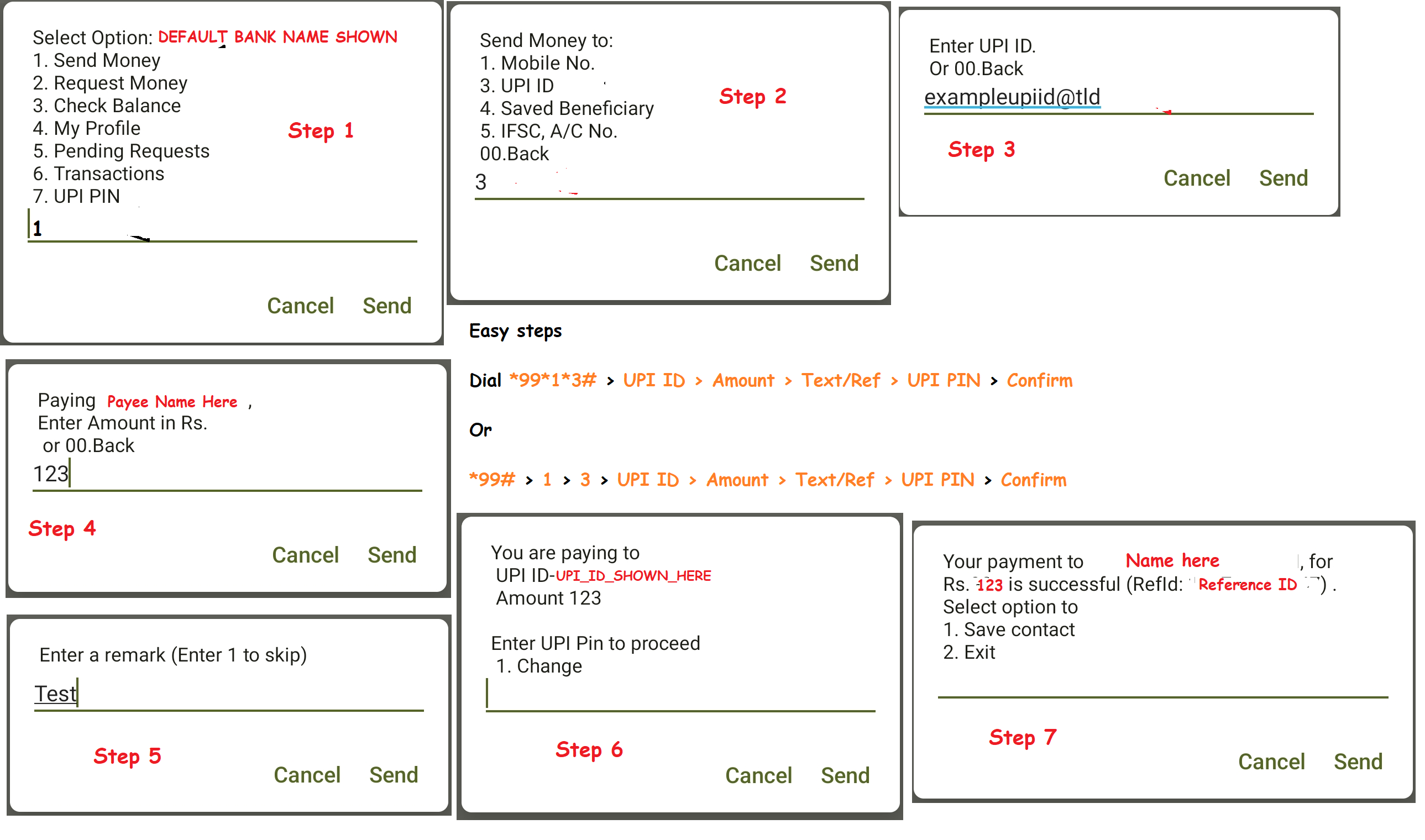
All I did was *99# > 1 > 3 > UPI ID > Amount > Text/Ref > UPI PIN > Confirm

One can also do it in shorter steps, like in any USSD code: *99*1*3# > UPI ID > Amount > Text/Ref > UPI PIN > Confirm

Please mind that you need to have the USSD UPI function activated, else this does not work.

I have captured it step wise in the below image as well.


USSD UPI Steps


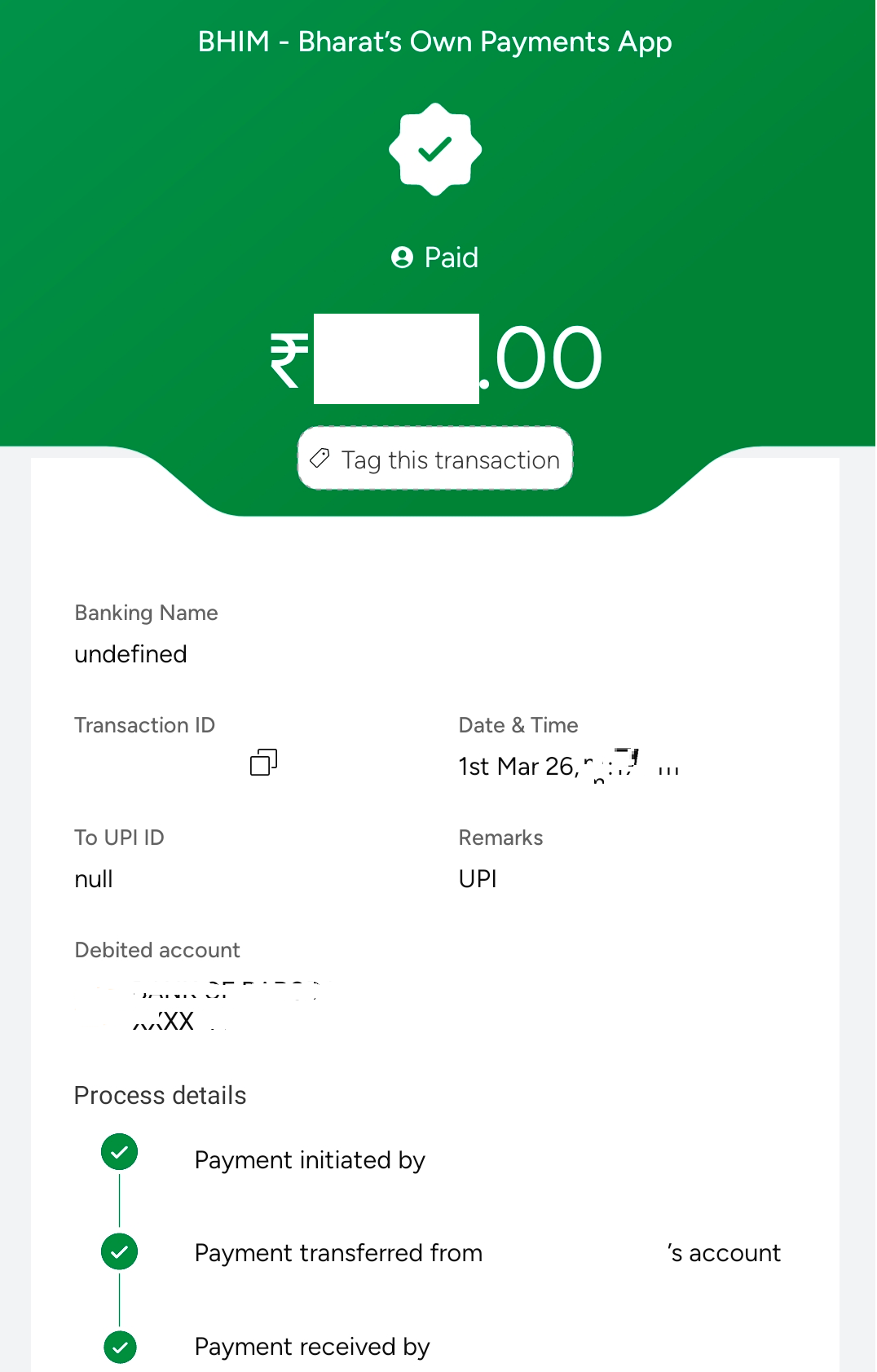
Update: I just cross checked to see what it shows up on my BHIM UPI, now this is weird. It is blank name and upi detail for the receiver. Very odd. Bug maybe?
Update 2: This seemed to be a temporary issue. Rest 4-5 payments I made, all showed correctly, without any issues.
BHIM Corrupted Entry
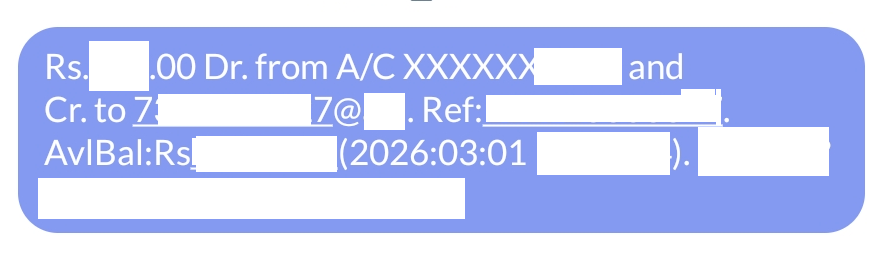
Though the SMS which I received, showed correct details. See image below
SMS Shows Correct details

Mastodon

Server down

- Posted in Linux/Unix by

In the morning I found out, my fbin.in server is down. When I checked, I cannot see the server in my list of products.

I have reached out to the support team, and awaiting for their Germany login time to reply.

Not even sure how this happened, as my other servers are running fine. Finding it very odd.

There is one more point which comes to mind: if I had a good ISP provider at home, and port openings, this would probably be with me, but home-server is not possible, unfortunately, at least for me. :(

Update: 28.01.2026 -> So basically, I had to get a new server from them to get all up and running. Seems, and I take full responsibility for this, I only placed a cancellation order, and never realized it, or forgot all about it. Though this has nothing to do with bus factor, as even in community (take Bento's docker issue for example), the ownership remains with 1 person, the owner.

Anyways, my instances are all up and running now, and hopefully, I will not face this situation again.

Server side secure banking in India?

- Posted in Android by

India specifically has a approach of client side encryption, which for banking/payments is not necessary at all. Nothing is stored client side on an app, or a browser, so why do you need client side security?

If I am rooted, using magisk, shizuku or whatever on my phone, why would it matter to you as a bank? If your server side encryption is ON, robust, working, and is there, then you have nothing to worry. You anyways prohibit snapshot, recent gets blurred; so, why the heck do you force us to use your senseless apps which should in the first place not be reading what I have installed, or which app is using which feature on my phone. This is privacy breach, no safe space for me, and you are violating my constitutional rights, all in one go.

All Indian banking and UPI apps force you to not have #accessibility turned on (even though they f'ing use it themselves); no #root; no #bootloader-unlocked (seriously, you are snooping to kernel level!!!); no #developer-mode on; no #debugging mode on; no 3rd party #keyboards (reason: they snoop, and foogle does not snoop? The first thing foogle keyboard does is share your typing data to its servers); only keyboards in /sys/priv & /sys/priv-apps are permitted. What nonsense... What are you trying to hide that debugging will reveal, or any of these will reveal? You have closed source your codes, you do everything behind paywall, and you stink!

#indianbankingapps; #hsbc; #bob; #sbi; #hdfc; #icici; #bhimupi & rest of #illiterate-developers

Ref: RBI_Circular (PDF)

Upgrade Forgejo

- Posted in Linux/Unix by

Forgejo is the best when it comes to hosting your own stuff over a git. Rest all for me have been dull, and I get the pain for setting up any sort of app/software.

Anyhow, what I love about the binaries is, forgejo for one is the simplest to setup. Here is how I do it:


systemctl stop forgejo.service && wget https://codeberg.org/forgejo/forgejo/releases/download/vX.X.X/forgejo-X.X.X-linux-amd64 && chmod +x forgejo-X.X.X-linux-amd64 && cp forgejo-X.X.X-linux-amd64 /usr/local/bin/forgejo && chmod 755 /usr/local/bin/forgejo && systemctl start forgejo.service && rm forgejo-X.X.X-linux-amd64 && systemctl status forgejo.service

Simply replace the X.X.X with the version you are installing. Example: 11.0.9 or 13.0.4 (latest ones).

So something like:

systemctl stop forgejo.service && wget https://codeberg.org/forgejo/forgejo/releases/download/v13.0.4/forgejo-13.0.4-linux-amd64 && chmod +x forgejo-13.0.4-linux-amd64 && cp forgejo-13.0.4-linux-amd64 /usr/local/bin/forgejo && chmod 755 /usr/local/bin/forgejo && systemctl start forgejo.service && rm forgejo-13.0.4-linux-amd64 && systemctl status forgejo.service

or for the LTS:

systemctl stop forgejo.service && wget https://codeberg.org/forgejo/forgejo/releases/download/v11.0.9/forgejo-11.0.9-linux-amd64 && chmod +x forgejo-11.0.9-linux-amd64 && cp forgejo-11.0.9-linux-amd64 /usr/local/bin/forgejo && chmod 755 /usr/local/bin/forgejo && systemctl start forgejo.service && rm forgejo-11.0.9-linux-amd64 && systemctl status forgejo.service

Copy Move

- Posted in Linux/Unix by

To ensure . files get moved/copied in one go.

Run - shopt -s dotglob

Then example - mv /tmp/home/source/* /home/destination/

You can put - shopt -s dotglob in your ~/.bashrc if you want it to be the default

Then run - source ~/.bashrc for it to reload

This I got from: Ubuntu Answers

India & oss

- Posted in First Timers by

Recently I have seen a lot of hub-dub about India going "make in India", especially towards governmental suits. Now, I really would love to have that done for India. Given if India goes OSS, while propagating so much about OSS, would really be the right step. Instead what has happened is going to zoho. Now zoho may claim to be secure and stuff, but we all know one thing for sure, unless I know what the software is made of, to the last line of code, how can I really be going OSS, or for that sake safe?

Even though I do not know how to read the whole code, but if the code is open and available, it gives me a security and risk free of knowing the community is aware and will surely raise or has already raised what is there, and what not, inflight risks included.

What actually is happening, or rather what has already gone BAU: Zoho lands GOI contract for 7 years

Email accounts of 12 lakh Central government employees now run on Zoho’s platform

Community at large is aware of what Zoho did recently. The so called "ulaa browser" is simply a closed sourced duplicate of Chromium + whatever they are hiding behind the wall. They landed lakhs of rupees in this doing, which was the start of blinding the already foolish bureaucrats.

Politics is all about money, power and the 4 legs of a chair. This contract is nothing but one and all of those pointers. There is nothing unique abut Zoho. There is nothing right about their so called whatsapp replacement, arratai.

Zoho reminds me of how bollywood is the best in copy-pasting. How Netflix readily copies from some original French or German movie/series and whips up a Spanish series. I will not deny, copy-pasting and trying to hide it is a big art, and artists like this are abundant, but eyes open one day, for everyone. Trouble is, it is already too late by then.

Wake up India. Rather while you are already awake, please stop wasting tax payers money, and do not use closed source software and compromising public data with closed sourced conglomerates as well.

We did not allow it. We did not bring you to power for doing what is not right. Remember, public has the biggest power. Pen really is mightier than 4 legs of your chair.

Meanwhile, GOI nonsense which raked my brain was:

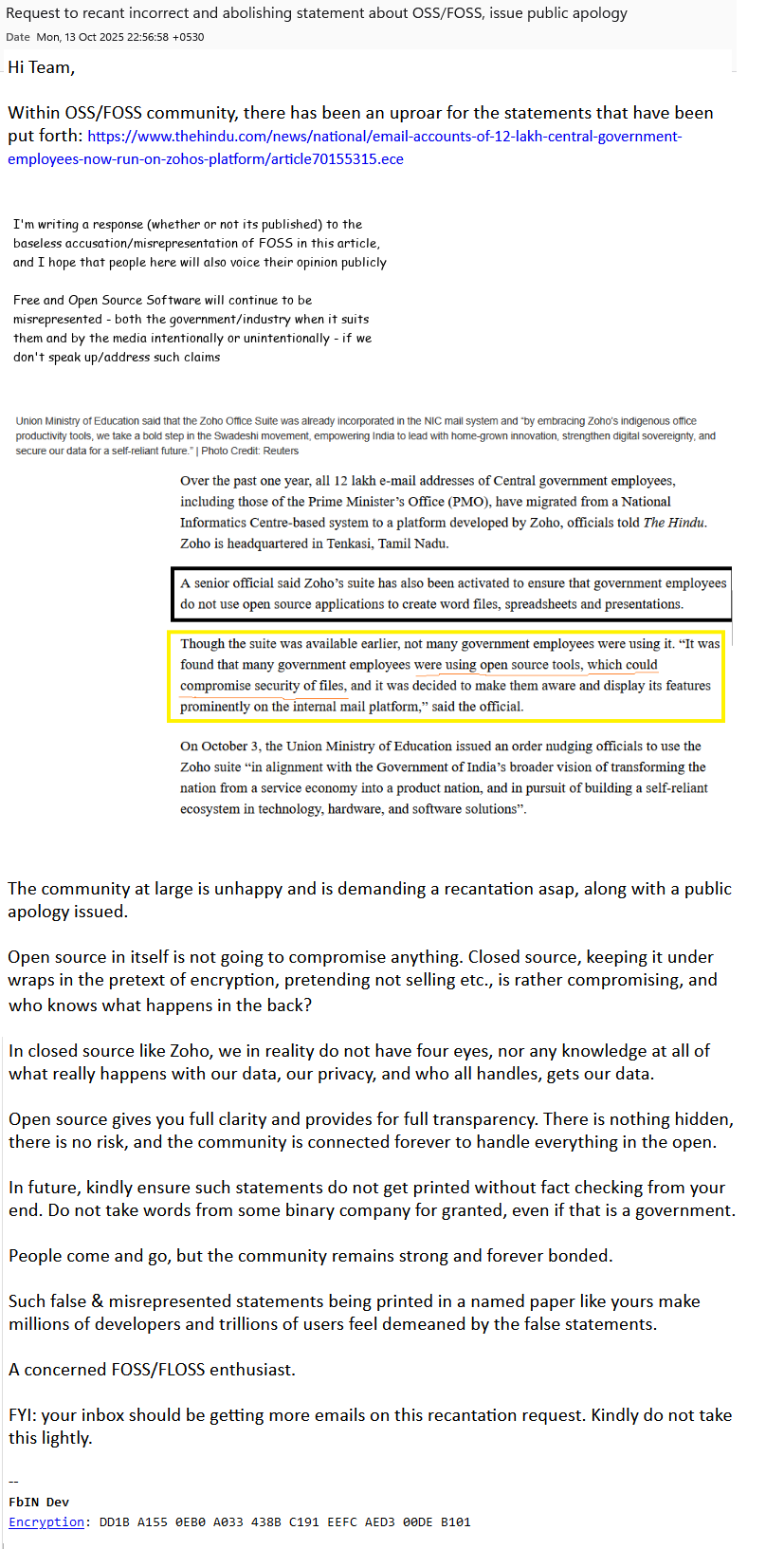
Union Ministry of Education said that the Zoho Office Suite was already incorporated in the NIC mail system and “by embracing Zoho’s indigenous office productivity tools, we take a bold step in the Swadeshi movement, empowering India to lead with home-grown innovation, strengthen digital sovereignty, and secure our data for a self-reliant future.”

& furthermore, what is this supposed to mean?

A senior official said Zoho’s suite has also been activated to ensure that government employees do not use open source applications to create word files, spreadsheets and presentations.

Though the suite was available earlier, not many government employees were using it. “It was found that many government employees were using open source tools, which could compromise security of files, and it was decided to make them aware and display its features prominently on the internal mail platform,” said the official.

Are you even aware what you are saying? Simply put, "Seriously!!!"

So you mean millions of developers and trillions of users of OSS/FOSS/FLOSS are brainless? Everyone is getting compromised by using OSS/FOSS/FLOSS stuff?

This is one cake; MoE, are you even aware what you just did?

On October 3, the Union Ministry of Education issued an order nudging officials to use the Zoho suite “in alignment with the Government of India’s broader vision of transforming the nation from a service economy into a product nation, and in pursuit of building a self-reliant ecosystem in technology, hardware, and software solutions”.

This reminds me of how everyone thinks foogle is the "guru of search" (ref: The Vault Of Vishnu - Ashwin Sanghi, page 85, line 5 from top). Makes me laugh out loud.

I have reached out to The Hindu & The Zoho & will also reach out to MoE specifically to recant those words, and publicly apologies. They are already so deep into ego, they need to learn: they are the one in need of a real education and not the other way round here.

enter image description here

[Guide]Let's Encrypt SSL/HTTPS Certificate for a unique port with HestiaCP

- Posted in Guides by

Introduction

In this tutorial, I will guide you through the process of setting up a let's encrypt ssl/https certificate (reverse proxy) on a unique port other than 80/443, example port:4545 on the root server for hosting using Hestia Control Panel (See installation URL given under prerequisites below). Hestia Control Panel is a popular open source web server control panel that simplifies the management of your website, email accounts, databases, and other hosting-related tasks. This tutorial is compatible with both VPS and Root Server offerings by netcup.

Assumptions:

  • You already have a sub-domain setup and the requisite service installed at the specified http port (example - http://sd1.domain.tld:4545).
  • You have the sub-domain setup with SSL/HTTPS (443) setup (example - https://sd1.domain.tld)
  • You have bare minimum knowledge of terminal, web servers, vhosts, reverse proxy.

The reading time of this tutorial is about 35 minutes; implementation will take approximately 60-70 minutes.

Background

The objective of Let’s Encrypt and the ACME protocol is to make it possible to set up an HTTPS server and have it automatically obtain browser-trusted certificates without any human intervention. This is accomplished by running an ACME client on a web server. To know more, visit Let's Encrypt. This also forms a part for use in Nginx reverse proxy configuration.

Forgejo is a self-hosted lightweight software forge (simple software project management). Easy to install and low maintenance, it just does the job.

In the world of open-source software, the story of how a project is governed is often as important as the code itself. Forgejo is a powerful testament to this fact. It is a “soft fork” of Gitea, created by a community of users and contributors to ensure that the project’s future remains in the hands of a non-profit, community-driven organization.

Born out of concerns following the creation of a for-profit company to manage Gitea, Forgejo’s mission is to be a truly free and open-source software (FOSS) forge, managed under the stewardship of the Codeberg e.V. non-profit. It is technically very similar to Gitea, but philosophically, it represents a commitment to community ownership and non-commercial governance.

Since Forgejo by default/design runs on port 4545 and many other projects also default to port 4545, I chose a different port (example 4545 here). This helps me keep it running in the background without conflicting with other applications. This was necessary for 2 more reasons:

  • Clean url everytime Example instead having to type or visit https://git.example.com:4545 every time, I will have a cleaner url as https://git.example.com.
  • Issue an HTTPS/SSL/TLS enabled URL and enjoy the higher level of security. Visitors & users of my site would also know they are safe.

Prerequisites

  • A server from netcup with latest Ubuntu 20.04/22.04/LTS; Debian 10/11/12/LTS or later installed (see the below URL) - use minimal mode of installation, also called clean installation. Installation Tutorial or the blog guide here.
  • A registered domain name
  • Access to your server

Step 1: Update your system

Before we begin, it's essential to ensure that your system is up-to-date. Log in to your server via SSH as the root user and run the following command:

For Ubuntu/Debian:

apt update && apt upgrade -y

Step 2: Add the necessary changes to the service (example git)

username@serverip:port

I created a normal subdomain at normal 80/443 ports with LE SSL generated. Then in the git app.ini (/etc/git/app.in) file, added this under [server]

nano /etc/git/app.ini
--------------
[server]
ENABLE_ACME = enable
HTTPS_PORT = 4545 ssl
ROOT_URL = https://git.domain.tld
-------------- **(save changes to the file by typing CTRL+X simultaneously)**
CTRL+X
Y
Enter

Then under nginx.conf ($HESTIADATA\conf\web\git.domain.tld\nginx.conf) I added

nano /$HESTIADATA\conf\web\git.domain.tld\nginx.conf
--------------
 location / {
     client_max_body_size 4096M;
     proxy_pass http://localhost:4545;
     proxy_set_header Connection $http_connection;
     proxy_set_header Upgrade $http_upgrade;
     proxy_set_header Host $host;
     proxy_set_header X-Real-IP $remote_addr;
     proxy_set_header X-Forwarded-For $proxy_add_x_forwarded_for;
     proxy_set_header X-Forwarded-Proto $scheme;
-------------- **(save via)**
CTRL+X
Y
Enter

Then under apache2.conf ($HESTIADATA\conf\web\git.domain.tld\apach2.conf) I added

nano /$HESTIADATA\conf\web\git.domain.tld\apache2.conf
--------------
     ProxyPreserveHost On
     ProxyRequests off
     AllowEncodedSlashes NoDecode
     ProxyPass / http://localhost:4545/ nocanon
-------------- **(save via)**
CTRL+X
Y
Enter

Then under apache2.ssl.conf ($HESTIADATA\conf\web\git.domain.tld\apache2.ssl.conf) I added

nano /$HESTIADATA\conf\web\git.domain.tld\apach2.ssl.conf
--------------
 < VirtualHost git.domain.tld:8443 https >
*****************************
*****************************
    ProxyPreserveHost On
     ProxyRequests off
     AllowEncodedSlashes NoDecode
     ProxyPass / http://localhost:4545/ nocanon
-------------- **(save via)**
CTRL+X
Y
Enter

I also enabled the following to ensure the proxy works:

 a2enmod proxy
 a2enmod proxy_http
 a2enmod proxy_balancer
 a2enmod proxy_wstunnel
 systemctl restart apache2

Then I restarted all services

 systemctl restart apache2
 systemctl restart nginx
 systemctl start git.service

I got the help from these:

APache SSL long record rrror

Let's Encrypt SSL certificate

Gitea reverse proxy - Apache HTTPD

Gitea reverse proxy - general conf

Gitea reverse proxy - NGINX

Someone's personal Forgejo guide

Conclusion

Awesome! You've successfully set up a let's encrypt certificate on a unique port other than the usual 443/8443.
Sir? SIR!, Sire?

- Posted in Blabbermouth, me by

So just a bit of rant here. When you are in the corporate nonsense, a layer matters, I guess? People are so filled with ego, that they will ask someone what your level is. Example: Security, Bull, Bombay, or even Greece, does not matter, but if there is a swipe machine at the gate, I am sure it is not there as a museum piece, right? You need to swipe it, so swipe it for god's sake. What has someone's level in the company gotta do with it? I saw him/her entering without swiping. I requested, please swipe. The look was killing. Blurted: what "f level are you?"


🤣🤣🤣

So you see, why the SIRE comes into picture, MY LORD?


Point-Love-15