[Guide] Increase max characters posting count limit for self-hosted Mastodon server

- Posted in Guides by

If you search for the max_characters keyword in the Mastodon Github repository, you will see that it all points to the value within the StatusLengthValidator and a variable called MAX_CHARS.

MAX_CHARACTERS_LOCAL  = 255

To modify it, first, ssh into your Mastodon server, and switch to the root shell:

sudo -s

Then, switch to the Mastodon user

su - mastodon

Now, modify the validator file:

nano -w live/app/validators/status_length_validator.rb

At the very top of the file, you will see the MAX_CHARS variable, which was by default 500, you can modify it to another integer, for example 3000 to allow a maximum of 3000 characters within each post.

class StatusLengthValidator < ActiveModel::Validator
  MAX_CHARS = 3000
  URL_PLACEHOLDER_CHARS = 23
  URL_PLACEHOLDER = 'x' * 23

Exit to root shell and restart the Mastodon processes, or simply reboot.

exit
systemctl restart mastodon*

[Guide] PuTTY Backup & Restore [Windows]

- Posted in Guides by

Export

cmd.exe, requires elevated prompt due to reg-edit:

Only sessions (produces file putty-sessions.reg on the Desktop):

regedit /e "%USERPROFILE%\Desktop\putty-sessions.reg" HKEY_CURRENT_USER\Software\SimonTatham\PuTTY\Sessions

All settings except ssh keys (produces file putty.reg on the Desktop):

regedit /e "%USERPROFILE%\Desktop\putty.reg" HKEY_CURRENT_USER\Software\SimonTatham

Powershell

Only sessions (produces file putty-sessions.reg on the Desktop):

reg export HKCU\Software\SimonTatham\PuTTY\Sessions ([Environment]::GetFolderPath("Desktop") + "\putty-sessions.reg")

All settings except ssh keys (produces file putty.reg on the Desktop):

reg export HKCU\Software\SimonTatham ([Environment]::GetFolderPath("Desktop") + "\putty.reg")


Import

Double-click on the *.reg file and accept the import.

Alternative ways:

cmd.exe, requires elevated command prompt:

regedit /i putty-sessions.reg
regedit /i putty.reg

PowerShell

reg import putty-sessions.reg
reg import putty.reg

Note: do not replace SimonTatham with your username.

Note: These commands will not export the related SSH keys.


Via Registry Editor

Export

  • Launch Run, then type regedit in the open drop down window
  • Navigate to HKEY_CURRENT_USER\Software\SimonTatham
  • Right click on SimonTatham key (directory icon), select Export. Give the file a name (say) putty.reg and save it to your location for later use.
  • Close Registry Editor.

Note: The export (full) will also export the related SSH Host Keys.

Import

  • Check previous method(s)

PuTTY Portable Restore

[path_to_Your_portable_apps]PuTTYPortable\Data\settings\putty.reg
[Guide] USSD UPI

- Posted in Android by

TL;WW


I tried paying via USSD UPI today, and it worked. I had to use the UPI ID function, and did not go through with mobile number, but it worked.

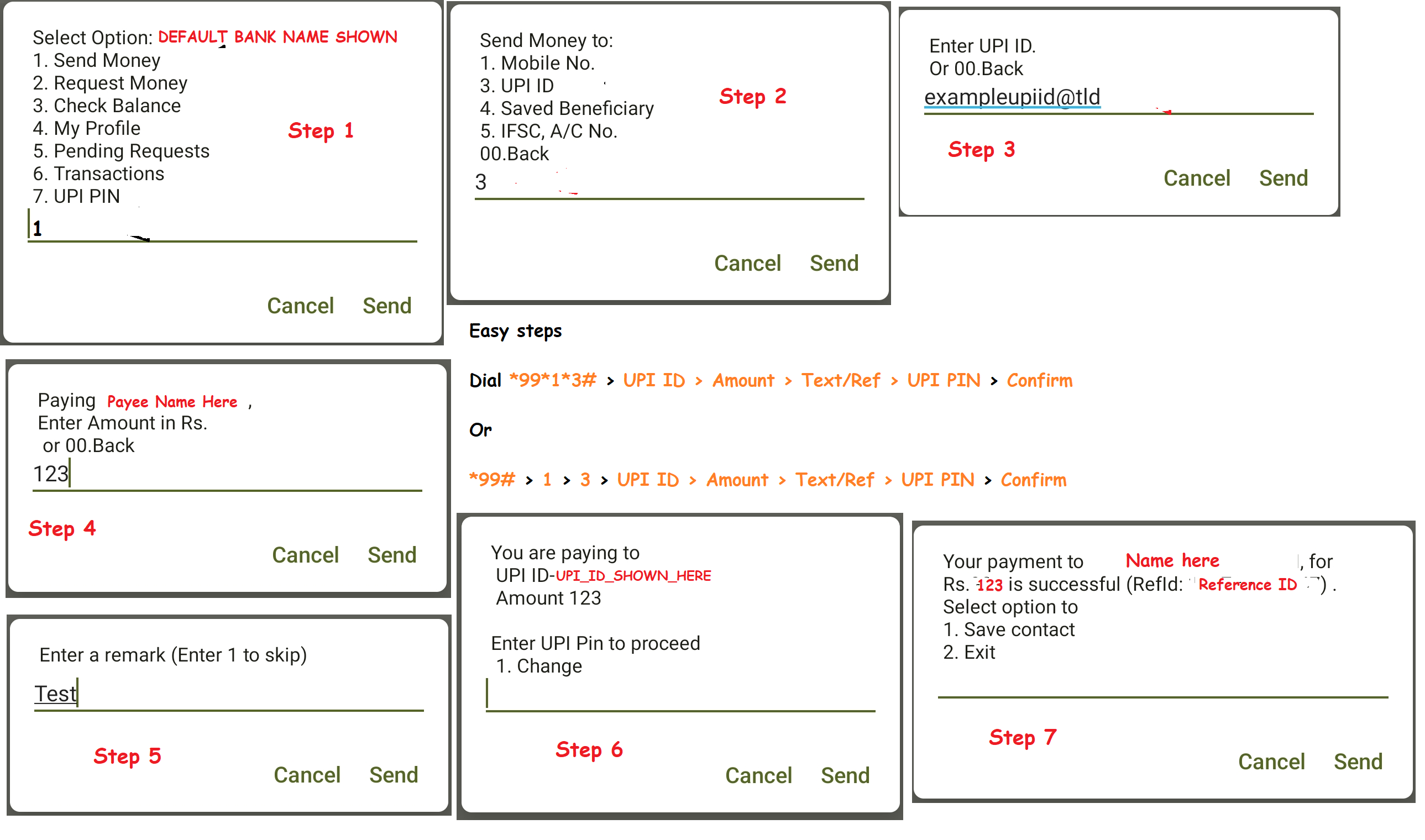
All I did was *99# > 1 > 3 > UPI ID > Amount > Text/Ref > UPI PIN > Confirm

One can also do it in shorter steps, like in any USSD code: *99*1*3# > UPI ID > Amount > Text/Ref > UPI PIN > Confirm

Please mind that you need to have the USSD UPI function activated, else this does not work.

I have captured it step wise in the below image as well.


USSD UPI Steps


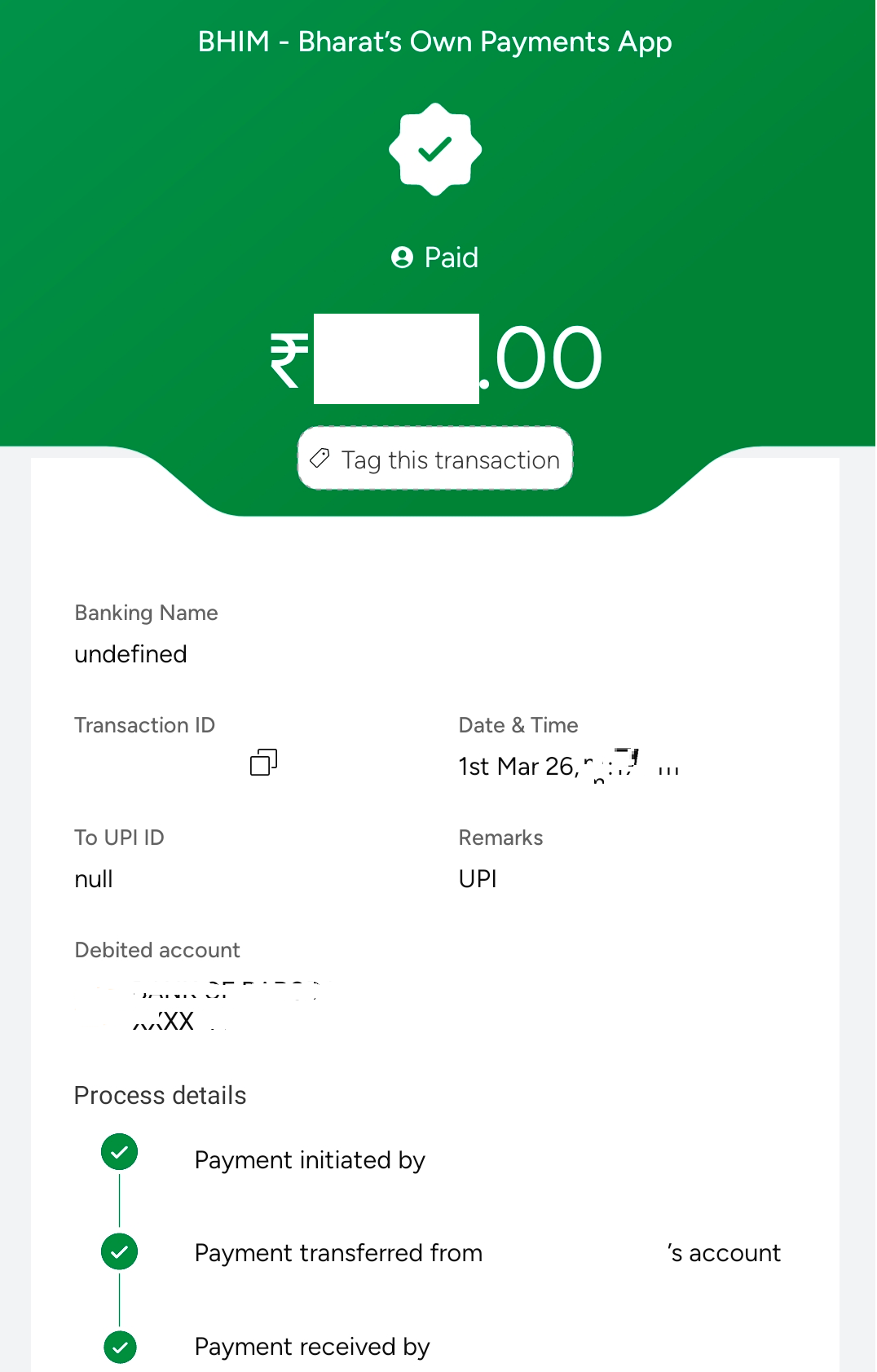
Update: I just cross checked to see what it shows up on my BHIM UPI, now this is weird. It is blank name and upi detail for the receiver. Very odd. Bug maybe?
Update 2: This seemed to be a temporary issue. Rest 4-5 payments I made, all showed correctly, without any issues.
BHIM Corrupted Entry
Though the SMS which I received, showed correct details. See image below
SMS Shows Correct details

Mastodon

Server down

- Posted in Linux/Unix by

In the morning I found out, my fbin.in server is down. When I checked, I cannot see the server in my list of products.

I have reached out to the support team, and awaiting for their Germany login time to reply.

Not even sure how this happened, as my other servers are running fine. Finding it very odd.

There is one more point which comes to mind: if I had a good ISP provider at home, and port openings, this would probably be with me, but home-server is not possible, unfortunately, at least for me. :(

Update: 28.01.2026 -> So basically, I had to get a new server from them to get all up and running. Seems, and I take full responsibility for this, I only placed a cancellation order, and never realized it, or forgot all about it. Though this has nothing to do with bus factor, as even in community (take Bento's docker issue for example), the ownership remains with 1 person, the owner.

Anyways, my instances are all up and running now, and hopefully, I will not face this situation again.

Server side secure banking in India?

- Posted in Android by

India specifically has a approach of client side encryption, which for banking/payments is not necessary at all. Nothing is stored client side on an app, or a browser, so why do you need client side security?

If I am rooted, using magisk, shizuku or whatever on my phone, why would it matter to you as a bank? If your server side encryption is ON, robust, working, and is there, then you have nothing to worry. You anyways prohibit snapshot, recent gets blurred; so, why the heck do you force us to use your senseless apps which should in the first place not be reading what I have installed, or which app is using which feature on my phone. This is privacy breach, no safe space for me, and you are violating my constitutional rights, all in one go.

All Indian banking and UPI apps force you to not have #accessibility turned on (even though they f'ing use it themselves); no #root; no #bootloader-unlocked (seriously, you are snooping to kernel level!!!); no #developer-mode on; no #debugging mode on; no 3rd party #keyboards (reason: they snoop, and foogle does not snoop? The first thing foogle keyboard does is share your typing data to its servers); only keyboards in /sys/priv & /sys/priv-apps are permitted. What nonsense... What are you trying to hide that debugging will reveal, or any of these will reveal? You have closed source your codes, you do everything behind paywall, and you stink!

#indianbankingapps; #hsbc; #bob; #sbi; #hdfc; #icici; #bhimupi & rest of #illiterate-developers

Ref: RBI_Circular (PDF)

Upgrade Forgejo

- Posted in Linux/Unix by

Forgejo is the best when it comes to hosting your own stuff over a git. Rest all for me have been dull, and I get the pain for setting up any sort of app/software.

Anyhow, what I love about the binaries is, forgejo for one is the simplest to setup. Here is how I do it:


systemctl stop forgejo.service && wget https://codeberg.org/forgejo/forgejo/releases/download/vX.X.X/forgejo-X.X.X-linux-amd64 && chmod +x forgejo-X.X.X-linux-amd64 && cp forgejo-X.X.X-linux-amd64 /usr/local/bin/forgejo && chmod 755 /usr/local/bin/forgejo && systemctl start forgejo.service && rm forgejo-X.X.X-linux-amd64 && systemctl status forgejo.service

Simply replace the X.X.X with the version you are installing. Example: 11.0.9 or 13.0.4 (latest ones).

So something like:

systemctl stop forgejo.service && wget https://codeberg.org/forgejo/forgejo/releases/download/v13.0.4/forgejo-13.0.4-linux-amd64 && chmod +x forgejo-13.0.4-linux-amd64 && cp forgejo-13.0.4-linux-amd64 /usr/local/bin/forgejo && chmod 755 /usr/local/bin/forgejo && systemctl start forgejo.service && rm forgejo-13.0.4-linux-amd64 && systemctl status forgejo.service

or for the LTS:

systemctl stop forgejo.service && wget https://codeberg.org/forgejo/forgejo/releases/download/v11.0.9/forgejo-11.0.9-linux-amd64 && chmod +x forgejo-11.0.9-linux-amd64 && cp forgejo-11.0.9-linux-amd64 /usr/local/bin/forgejo && chmod 755 /usr/local/bin/forgejo && systemctl start forgejo.service && rm forgejo-11.0.9-linux-amd64 && systemctl status forgejo.service

[Book Review] A Murder In Paris - Matthew Blake

- Posted in Amazing Books by

Usually, I do not write about books, as I love to read and speak about the same, rather than jot down my memories about it. However, I guess I can start and with an exceptional book, I saw very differently.

Written by Matthew Blake, this book has woven the words in a different parallel line altogether. It relates so much to my own thoughts, how I see my vague memories as, how I have drifted them in ways I never imagines I could do.

The book is not just about how one sees and thinks, but how one remembers and recollects and then recalls the same recollection. With each passing step, that memory changes.

Started in one era; lied and kept that way for decades, to manipulate your own reality; how survival strategies were defined during the war, why someone can destroy you (own love) for mere survival. Seems survival of the cruelest, Cruella De Vil... .

What really resonates is this paragraph from pages 282-283:

Every time we recall a memory, we change the original, and all we have is the latest edited version of the memory. Over time, the memory that has been edited tens, hundreds, even thousands of times, has no connection with the original event. It could be your first kiss, the dying words of a loved one, a life-changing accident -- your memory of it will be different from how it actually happened, just because you've remembered it so many times.

enter image description here

I enjoy novels and suspense which lead to a deep examination of human nature—especially the question of whether memories can ever truly be trusted, with or without the influence of dementia. I highly recommend this book to everyone. It is a masterpiece in itself.